
This knowledge base article explains the key differences between Billable and Non-Billable clients in Bizman, focusing on how this distinction impacts tracking hours, tasks, and project profitability.
What is a Billable Client?
A Billable Client is an organization or individual for whom the work performed (tasks, meetings, deliverables) is directly charged back. The time spent on their tasks or projects is considered revenue-generating.
Key Characteristics in Bizman:
- Billable Badge: These clients are distinguished in the Client List by a prominent "Billable" badge for quick identification.
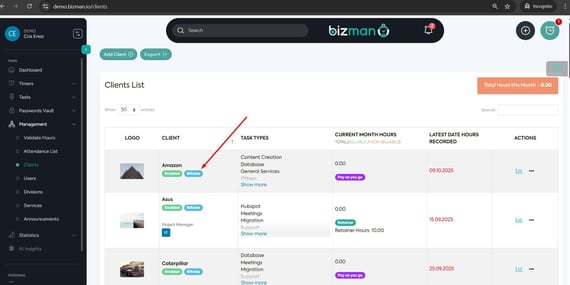
- Time Tracking: All hours logged against tasks for a Billable Client are generally considered Billable Hours.
- User Override: Users can check/uncheck the "Billable" status for any client, even those typically considered billable, to temporarily change the nature of the work being performed (e.g., performing pro bono work for a regular client).
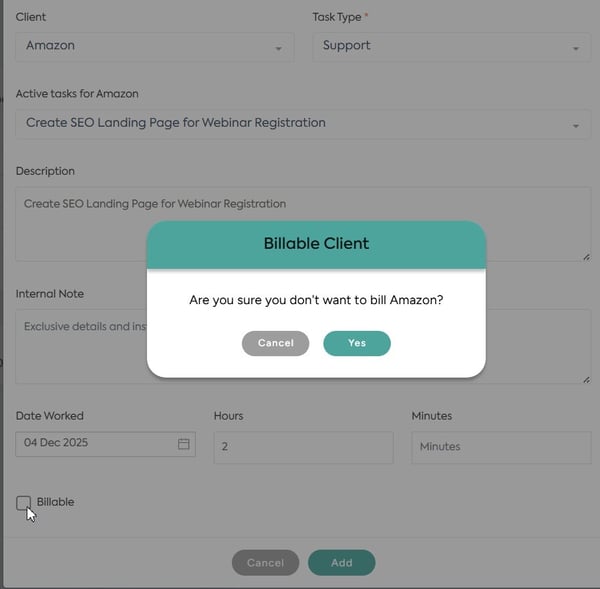
- Reporting Focus: Time and task creation for these clients are central to financial reports (invoicing, revenue tracking, project profitability).
What is a Non-Billable Client?
A Non-Billable Client is a client (or an internal project/department treated as a client) where the work performed is not directly invoiced to an external paying party. The time spent serving these clients is considered an operational expense rather than a revenue source.Key Characteristics in Bizman:
- Non-Billable Badge: In contrast with the Billable clients, these clients have the "Non-Billable" badge in the Client List for quick distinction.

- Time Tracking (Default): All hours logged against tasks for a Non-Billable Client are automatically tracked as Non-Billable Hours.
- User Override: The user logging the time can manually check the "Billable" status checkbox on the time entry form/timer to record a specific session as Billable.
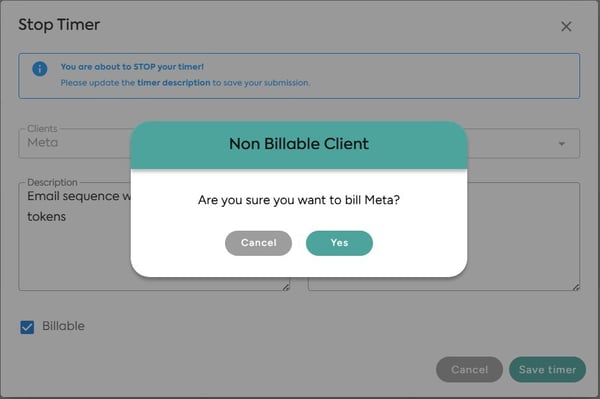
- Reporting Focus: This time is crucial for understanding internal resource allocation, operational costs, and overall team utilization.
Comparison Table: Client Status in Bizman
|
Feature |
Billable Client |
Non-Billable Client |
|
Primary Purpose |
Revenue Generation (Client Invoicing) |
Operational Expense (Internal Resource Tracking) |
|
Client List Indicator |
"Billable" badge present. |
"Non-Billable" badge present. |
|
Default Time Tracking |
All hours are automatically Billable Hours. |
All hours are automatically Non-Billable Hours. |
|
User Override (Time Entry) |
User can UNCHECK the Billable status to record a session as Non-Billable. |
User can CHECK the Billable status to record a session as Billable. |
|
Typical Use Case |
Client Project Work, Deliverable Creation, Meetings. |
Internal Training, Administrative Overhead, Pro Bono Work. |
Best Practices for Tracking in Bizman
- Trust the Default - The system automatically sets the time status (Billable/Non-Billable) based on the Client Status.
- Use the Override Judiciously - The ability to check/uncheck the Billable status is for exceptions. Always confirm before overriding, as this directly impacts client invoicing and revenue reporting.
- Always Track Hours - Even if a task is temporarily marked Non-Billable, accurately tracking the time is essential for calculating employee utilization and understanding operational costs.
-
On this page